_webp.webp)
How to Generate Anime Girl Voice with AI Free Online
 Olivia MitchellBusiness Operator
Have you ever had one of those moments where you’re looking for a reliable anime girl voice changer, spend ages perfecting your script, only to be met with mandatory sign-up screens or an output that sounds more like a robotic toaster than a character from Spy x Family?
If you're a VTuber, a game dev, or just making a TikTok, you shouldn't need a PhD in AI or a $50/month subscription just to get a decent "Ara Ara" or a high-energy "Genki" greeting. You need something that works in your browser, sounds human, and lets you download the file before you've even finished your coffee.
This guide covers the two fastest ways to generate high-quality results using an online anime voice changer — without the account-creation headache.
Table of Content
- Two Ways to Generate Anime Girl Voice Free Online
Method 1: Turn Text to Anime Girl Voice
-
Method 2: Upload Your Audio and Convert It to an Anime Girl Voice
-
Pro-Tips: How to Make Your AI Voice Sound Like Real Anime
-
Real-World Applications for AI Anime Girl Voice
-
Frequently Asked Questions about Anime Voice Changer
-
Start Generating
Two Ways to Generate Anime Girl Voice Free Online
Most people fall into one of two situations:
Situation A: You have a script. You want to turn it into an anime girl voice without recording anything yourself.
Situation B:You already have a voice recording. You want to convert it into an anime girl voice.
Both are covered below. Both are free. Neither requires an account.
Method 1: Turn Text to Anime Girl Voice
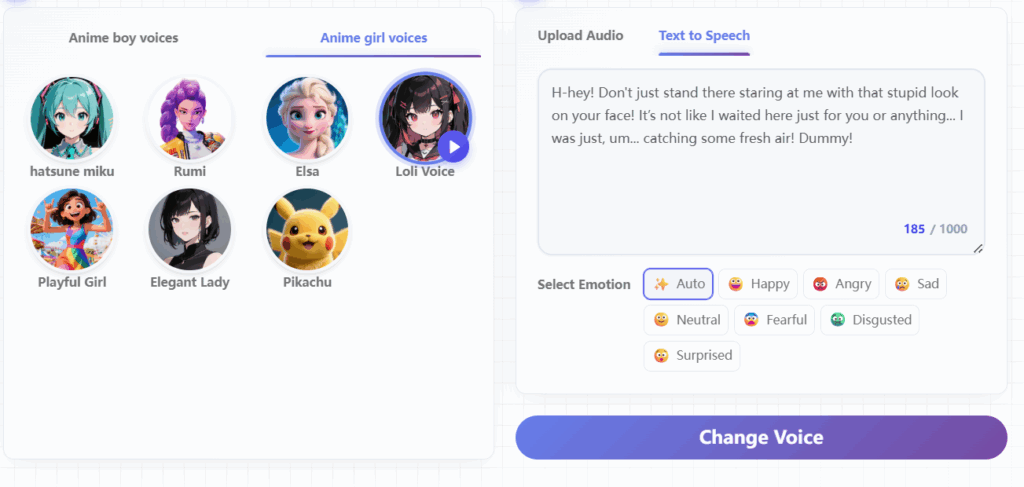
This is the fastest method. If you have a script — even just one line — the anime girl text to speech feature lets you generate a character voice without recording anything. You can get the result in seconds.
How turn text to speech on Anime Voice Changer:
Step 1: Open the tool — no account, no download needed
Go to anime voice changer and navigate to the anime girl voice text to speech feature. No sign-up screen, no email required, no software to install. You land on the tool and you start using it immediately.
Step 2: Type or paste your text
-
Enter whatever you want the anime girl voice to say. It can be a single line or a full script. A few tips that consistently improve output quality:
-
Use short sentences. Long, winding sentences sound robotic even in the best TTS systems. Break them up.
-
Write the way someone would actually speak. "Wait, are you serious right now?" sounds more natural than "I am inquiring as to whether you are being sincere."
-
Add punctuation deliberately. Commas create natural pauses. Exclamation marks push energy up. Question marks lift the end of a line. These small signals make a real difference in the final output.
-
Try emotional phrases. Lines like "No way!", "Hmm... let me think," or "That's so cute!" tend to produce more expressive, character-like output than neutral declarative sentences.
Step 3: Choose your anime girl voice
Browse the available voice options and select the style that fits your character or content. Different voices suit different use cases — more on this below.
Step 4: Generate and download
Hit generate. Preview the audio. If it sounds right, download it. If you want to try a different voice or adjust the text, go back and regenerate — it's free every time, with no daily limits to worry about.
Total time from opening the tool to having a finished audio file: under two minutes.
Method 2: Upload Your Audio and Convert It to an Anime Girl Voice
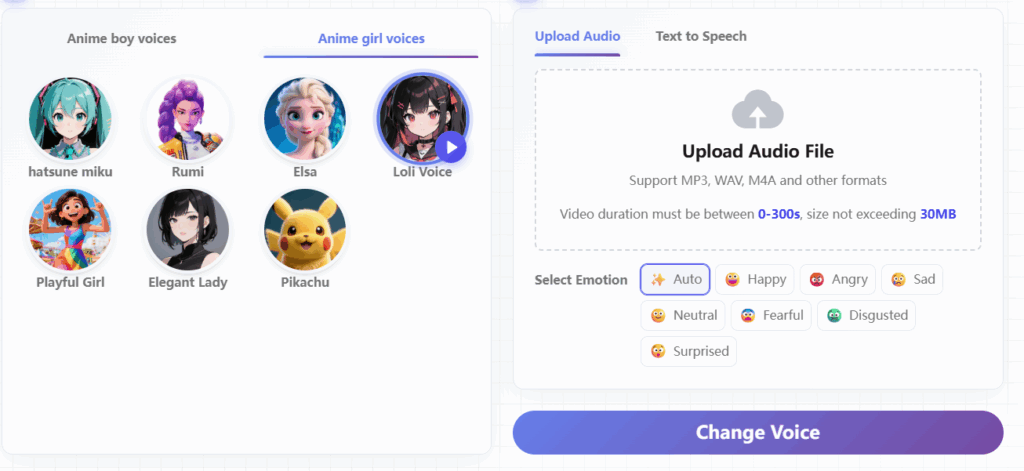
If you already have a recording — your own voice, a friend's voice, any audio clip — you can convert it into an anime girl voice online without re-recording anything.
How to do it on Anime Voice Changer:
Step 1: Prepare your audio file
-
Save your recording as an MP3 or WAV file. Before uploading, a few things that make a noticeable difference in output quality:
-
Record in a quiet space. Background noise doesn't disappear during conversion — it gets processed alongside the voice and introduces artifacts. A quiet room, a closet, even a car with the windows up works fine.
-
Speak clearly and at a steady pace. The AI reads the phonetic structure of your speech. Mumbled or rushed delivery makes the output sound off.
-
Keep one speaker per file. Multiple voices on the same track confuse the conversion and produce inconsistent results.
Step 2: Upload and select your anime girl voice
Go to voicechanger.video, upload your audio file, and choose the anime girl voice style you want. The same voice library is available for both the TTS and voice conversion methods.
Step 3: Generate and download
Hit generate. The tool separates your vocal content, maps it onto the selected anime girl voice model, and produces a file you can preview and download. No watermark, no login, completely free.
Pro-Tips: How to Make Your AI Voice Sound Like Real Anime Girls
Generating anime girl voice is easy, but making it sound like it jumped straight out of a seasonal anime requires a few "pro-level" tweaks. The AI anime voice changer respond differently to text cues and recording styles—here is how to get the most natural results.
1. Master the "Punctuation Hacks"
AI doesn't just read words; it reads the spaces between them. Standard grammar is often too stiff for anime characters. Try these:
-
The Ellipsis (...): Don't just use it for long pauses. Adding ... at the start of a sentence (e.g., "...Wait, really?") forces the AI to start with a soft, breathy intake of air, which is a staple in anime dubbing.
-
Exclamation Overload: One ! is a statement. Three !!! often tells the AI to increase the pitch and intensity.
-
The "Question" Lift: Even if it’s not a question, adding a ? at the end of a word can create that rising intonation often heard in "Tsundere" or surprised character archetypes.
2. Add "Filler Words" (The Secret Sauce)
Anime dialogue is rarely just clinical information. It’s emotional. To break the "robotic" feel, sprinkle in expressive onomatopoeia:
-
For Shyness/Thinking: Start with "Umm..." or "Eto..."
-
For Surprise: Use "Huh?!" or "Ehh?"
-
For Cuteness/Glee: Add a "Hehe" or "Yay!" at the end of the sentence.
Pro Tip: These small additions give the AI "vocal character" and make the transition between words sound much more fluid.
3. For Voice Conversion: The "Performance" Matters
If you are using Method 2 (Upload Your Audio), remember: the AI anime voice changer is mapping your energy.
-
Don't talk like yourself: If you want a high-energy anime girl output, you need to record your input with high energy.
-
Emphasize the vowels: Anime voices are often more melodic than daily speech. If you record with a "flat" voice, the output will feel a bit dull even if the AI model is great.
Real-World Applications for AI Anime Girl Voice
The rise of AI has made high-quality audio accessible to everyone. From viral marketing to immersive storytelling, here is how different creators are using an anime voice changer to transform their digital presence.
For Social Media Content Creators
In the fast-paced "attention economy" of TikTok, Reels, and YouTube Shorts, your audio is your first impression. Many creators use an anime girl voice to provide a "scroll-stopping" narrative for their clips. Whether you are creating funny skits, reaction videos, or "storytime" narrations, the high-energy and expressive nature of these voices helps your content stand out. An anime voice changer allows you to maintain a consistent digital persona across all your videos without needing expensive recording gear.
For VTubers and Live Streamers
For digital avatars, the voice is just as important as the visual design. Many VTubers use an anime voice changer to craft a distinct vocal identity that perfectly matches their 2D or 3D character model. This technology allows streamers to experiment with various archetypes—from the bubbly "Genki" girl to the mysterious "Kuudere"—enabling deeper roleplay and more engaging interactions with their fans. It is also an essential tool for creators looking to protect their privacy while still maintaining a professional-sounding anime girl voice.
For Indie Game Developers & Visual Novel Authors
Independent developers often work with tight budgets, making it difficult to hire a full cast of voice actors. An anime voice changer serves as a high-quality prototyping and production tool, allowing teams to generate anime girl voice lines for NPCs and protagonists instantly. This is particularly valuable for visual novels with thousands of dialogue lines. It gives developers the flexibility to match a character's traits—like a shy girl or a heroic rival—with precision and speed.
For Creative Hobbyists and Fan Dubbing
The anime community is built on a foundation of creativity. Fan dubbers and hobbyists use an anime voice changer to re-imagine their favorite scenes or create original "Abridged" series for YouTube. By converting their natural speech into a polished anime girl voice, creators can participate in storytelling projects that were previously limited by their vocal range. This technology lowers the barrier to entry, making professional-grade audio accessible to anyone with a great script and a vision.
Frequently Asked Questions About Anime Voice Changer
Do I need to create an account to generate an anime girl voice?
No. Our anime voice changer requires no login, no sign-up, and no email address. You can open the tool and start generating a high-quality anime girl voice immediately without any barriers.
Is this anime voice changer really free?
Yes — completely free, with no hidden subscription tiers or watermarked output. You generate and download your anime girl voice at no cost.
Can I use the generated audio on TikTok and YouTube?
Absolutely. Once you've used the anime voice changer to create your anime girl voice, you can download the file and use it however you need—drop it into any video editor, sync it with footage, or post it directly.
What's the difference between the TTS method and the voice conversion method?
The anime girl voice text-to-speech (TTS) method generates audio directly from written text—just type your script and you're done. Conversely, the anime voice changer conversion method takes an existing audio file and maps it onto the anime girl voice model. TTS gives you more control over phrasing, while conversion is faster if you already have a recording.
What audio formats are supported for upload?
The anime voice changer supports MP3 and WAV formats. It’s the most efficient way to transform your existing recordings into a professional anime girl voice. Keep files under the size and length limits for the best processing results.
Can guys use this to get an anime girl voice?
Yes—and it's one of the most common ways people use our anime voice changer. The AI maps your input onto the target anime girl voice model regardless of your original pitch or gender. The output reflects the character voice you selected, not a blend with your natural voice.
Start Generating
Two methods. Both free. Both online. Neither requires an account or a download.
If you're starting from a script, use the anime girl text to speech tool — type your lines and generate your anime girl voice in under two minutes.
If you're starting from a recording, upload your audio file and convert it directly.
Try this anime voice changer now — no download, no login, and your first result is ready faster than you'd expect.